Bounties on your repositories
Grainlify Bounties pay contributors for fixing selected issues. So far, bounties have been posted only on Grainlify's own repositories. A Grainlify operator posts each one through the Grainlify bounty agent; the agent then assesses the applicants, reviews the pull requests that claim the bounty, and reports on each merge. You stay in charge of your code: nothing is paid unless you merge, and a person approves every payout. This page covers what you'll see as the maintainer, on GitHub and on the Bounties tab in Maintainers, and what you can do there. For the contributor's side, read How Grainlify Bounties work.
Which repositories have bounties
A repository can have bounties when all of these are true:
- It's a verified project on Grainlify, with the Grainlify GitHub App installed. See Add your repositories.
- A Grainlify admin has switched bounties on for it.
You don't switch bounties on yourself. A Grainlify admin does it, and only for a repository that meets the first condition. Every change they make is recorded with who made it. If the project stops being verified or the App is removed, it no longer qualifies. To ask about bounties on your repository, get help.
What you'll see, step by step
-
The bounty is posted. It appears on the Bounties page in Grainlify with a set amount and a window for applications. Nothing is posted on the GitHub issue itself.
-
A contributor is drawn. Contributors apply on Grainlify while the window is open, and when it closes one is drawn. You can't choose who is drawn. The Bounties page shows Assigned to and the contributor's name, and the Bounties tab in Maintainers shows how the draw went. You can run the draw early, end an assignment or move its deadline: see What you can do.

-
The agent reviews the pull request. When a pull request closes the bounty issue, for example by saying
Closes #12, the agent posts a review headed Advisory review for bounty on #12: with Looks complete, Needs changes or Unclear, any concerns, and the state of your CI checks. It posts a fresh one when new commits arrive. It's a comment only: it never approves the pull request and doesn't block a merge. -
You review and merge as usual. Your merge is the gate. It must be done by someone with write access or above who isn't the pull request's author.
-
The agent reports on the merge. It comments Payout ready for approval if every check passed, or Payout refused by the gate if one didn't, with the full list of checks either way.
-
A person approves the payout. When the payment is sent, the agent comments Paid on the pull request, with the amount, the wallet and a link to the transaction.
The agent's comments end with a line signed Grainlify Agent.
The Bounties tab
Switch to MAINTAINER and choose the Bounties tab in Maintainers. Under Bounties on your repositories, it lists the bounties on every repository you have write, maintain or admin access to on GitHub, whatever you've chosen in Select repositories. Each bounty shows its issue title and amount. If none of your repositories has a bounty, the tab says No bounties on the repositories you maintain.
What you can see about the people who applied depends on where the bounty is.
While applications are open
You see a rough band, not a list: No applicants yet, A few applicants or Many applicants. If the programme hides the count, you see Applications are open instead. The tab also says when the window closes.
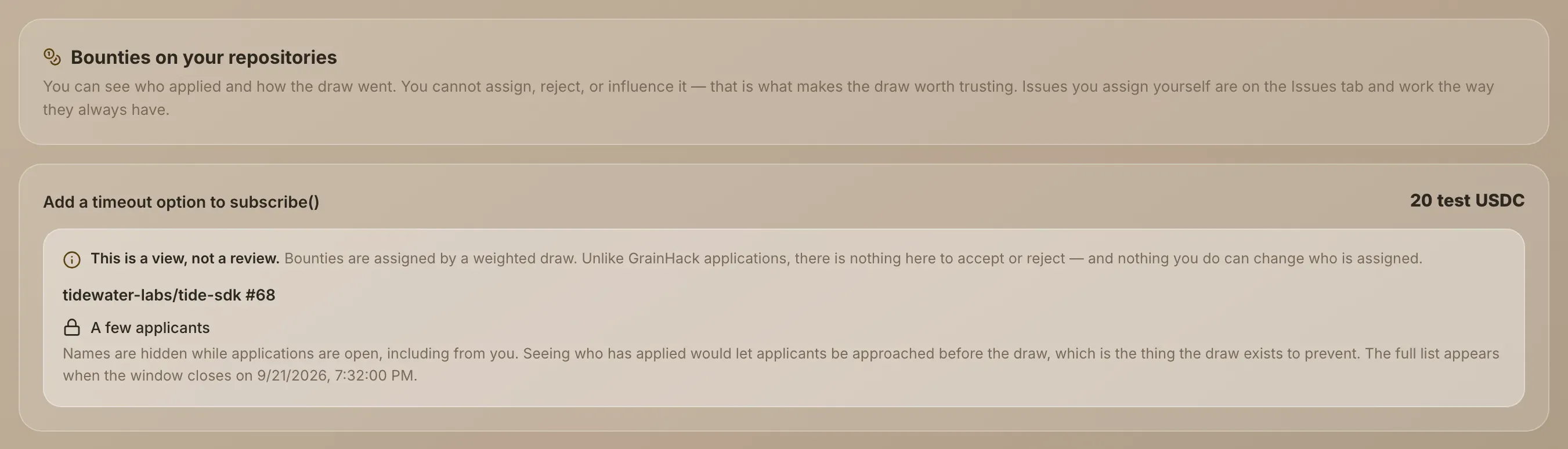
Names are hidden while applications are open, including from you. As the maintainer you have influence over the repository, and so over the people applying to it. If you could see who had applied, they could be approached before the draw, which is what the draw exists to prevent.
After the window closes
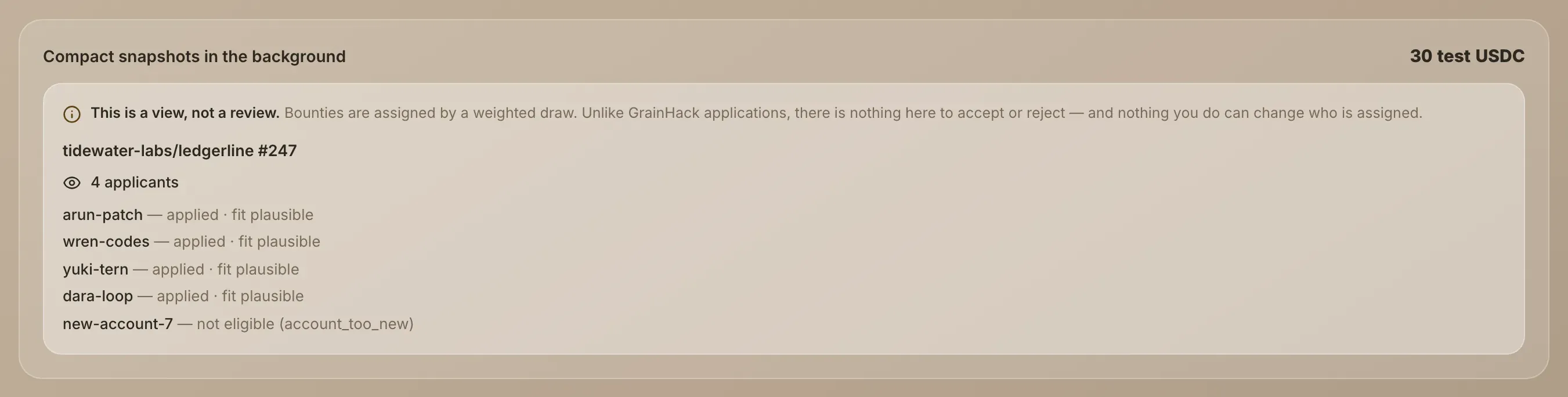
The full list appears: the number of applicants and every person who applied, each with their outcome.
| Outcome | What it means |
|---|---|
| applied | Passed the checks and is in the draw. |
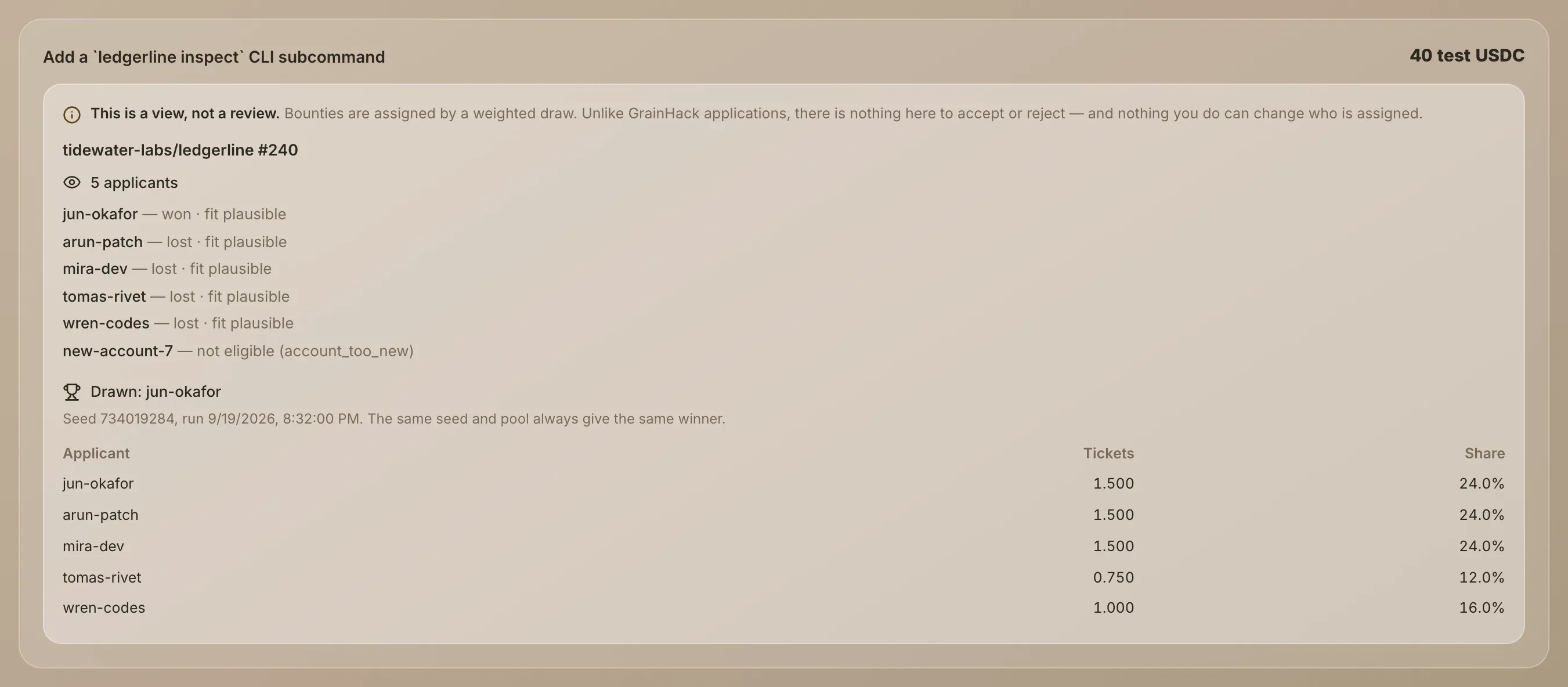
| won / lost | The draw has run, and this is how it went for them. |
| not eligible | A check turned them away, for example an account that's too new. The check is named in brackets. |
The list can also show each applicant's fit, the assessment the draw weighs. The number at the top counts the applicants who passed the checks, so it can be lower than the number of names.
After the draw
The tab shows Drawn: and the winner's GitHub login, or No winner and the reason. Below that are the draw's seed and when it ran, and a table with each applicant's Tickets and Share. The share is their tickets as a percentage of all tickets, so you can check the result as arithmetic rather than take it on trust. The same seed and pool always give the same winner. How tickets are weighted is published on the bounty rules page.
What you can do
You can't pick who wins a bounty: every draw is the same weighted draw, whoever starts it. What you can do is start a draw, end an assignment, and move a deadline. These controls appear on a bounty in the Bounties tab for anyone with write, maintain or admin access to its repository on GitHub. Each change is recorded, and the contributor is told.
Run the draw now, or simulate it
When a bounty's application window has closed and nobody holds it, the bounty shows Simulate and Run the draw now.
- Simulate runs the draw on the real pool of applicants and shows the result, but assigns nobody. Confirm with Yes, simulate. You'll see Simulated. Nobody was assigned.
- Run the draw now runs the real draw. Confirm with Yes, run the draw. One applicant is assigned and told, with their deadline. The draw also runs by itself when applications close, so you only need this if it hasn't.
- Deadline (hours, optional) sets how long the winner has to open a pull request. Leave it empty for the default on the bounty rules page.
End an assignment
While a contributor holds a bounty and hasn't opened a pull request, you can end the assignment.
- Write the reason in the box marked Why — the contributor is shown this. A reason is required.
- Choose Unassign.
The contributor is told why. Nothing is counted against them: no abandon is recorded and their odds on later bounties are unchanged. Nobody is drawn until you run the draw again; the button then reads Redraw now, and that draw skips the person you unassigned, this once.
Move the deadline
While a contributor holds a bounty and hasn't opened a pull request, you can change when their assignment runs out. Pick the new date and time, write the reason in Why — the contributor is told this too, and choose Move the deadline. The new deadline can't be in the past. The contributor is told the old and new deadline.
Once a pull request is open
When the contributor's pull request closing the issue is open, the bounty shows Held by their name and no controls. Their deadline no longer applies, and the pull request is reviewed and merged the normal way.
Every draw and unassign is public
Each bounty on the Bounties page has a Draw history: every real draw, whether it ran automatically or who ran it, who was drawn, and every unassign with who made it. Simulations are not listed, and the reason for an unassign is shown only to the contributor. Redrawing until a preferred contributor wins would happen in plain sight.
Issues you assign yourself are on the Issues tab and work as before. See Review applications.
What the checks look at
Among other things, the checks confirm that the pull request closes the bounty issue, that it was merged by a maintainer who didn't write it, that its author is the contributor drawn for the bounty, that they have a linked wallet, and that the bounty hasn't been paid already. The limits are published on the bounty rules page.
Only the drawn contributor's pull request can be paid. You can merge anyone's work, but a merge of someone else's pull request is refused for payment. Check Assigned to on the Bounties page first.
You can't win bounties on your own repositories
Anyone with write, maintain or admin access to a repository is turned away when they apply for its bounties. Self-merged pull requests are never paid either.
Test bounties
A bounty that isn't on Solana mainnet shows its amount with the word "test", such as "25 test USDC", and pays test tokens with no value. The top of the Bounties page says whether bounties are paying on mainnet yet. Every payment is listed in the bounty ledger.