How Grainlify Bounties work
Grainlify Bounties pay a fixed amount for fixing a specific issue on an open-source repository. This page explains where bounties come from, who pays for them, and how to read the Bounties page. When you're ready to take one, go to Apply for a bounty.
Where bounties come from
Bounties are posted on issues in repositories that are listed for bounties. So far that means Grainlify's own repositories. A repository can be listed when it's a verified Grainlify project with the Grainlify GitHub App installed, and a Grainlify admin has switched bounties on for it.
- A Grainlify operator posts each bounty through the Grainlify bounty agent, at a set amount.
- The agent assesses each applicant's fit for the issue, and reviews the pull request that comes in. Each assessment and review is an inference call the agent buys on UsePod, paying over x402. Its review is advice only.
- A maintainer of the repository decides whether to merge.
- A person approves every payout before it's sent. The agent can't approve one.
Bounties are paid in USDC on Solana mainnet, to the wallet linked to your GitHub account. No bounty has been paid yet; the status banner on the Bounties page changes when the first one is. What the agent spends on inference, and every payout, is recorded on the bounty ledger, each with a link to its proof. Inference spending is capped at $5 for the agent's whole lifetime.
Not first come, first served
A bounty is assigned by a weighted draw before anyone writes code. You apply while its window is open, one applicant is drawn when it closes, and only that person's pull request can be paid. Applying early gives you no advantage. A maintainer of the repository can end an assignment before a pull request is opened, with a reason the contributor is shown; the next draw then skips that person once. Every real draw and unassign is listed publicly under Draw history on the bounty. Apply for a bounty explains the draw.
Read the Bounties page
Choose Bounties in the rail. The Bounties pages need you to be signed in; only the bounty rules page is public.
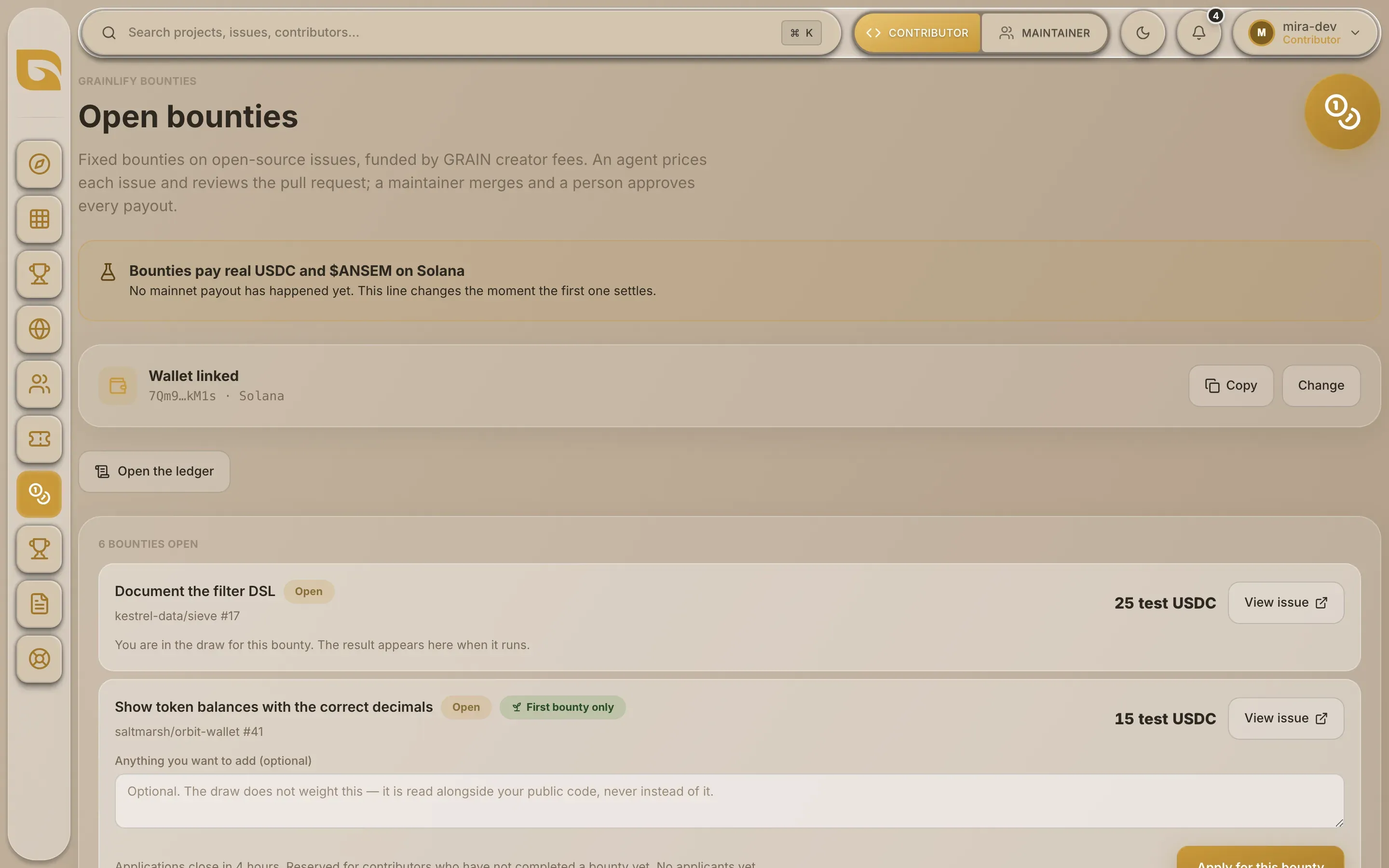
From the top:
- The status banner says what state the programme is in right now. It comes from the service that runs the programme, so it changes when the state does. Trust it over anything else you read, this page included. Until the first mainnet payout settles, it says so. If the bounty agent can't be reached, it says Status unavailable rather than guessing.
- Your wallet. Wallet linked with your address, or No wallet linked with a Link your wallet button. You need a linked wallet to apply.
- Open the ledger opens the bounty ledger.
- Open bounties. Each row shows the issue, its status, the repository and issue number, the amount, and View issue, which opens the issue on GitHub.
- Paid. Bounties already paid, with who was paid and a transaction link.
- How to claim a bounty. A short summary, with links to the rules.

Bounty statuses
| Status | What it means |
|---|---|
| Open | Posted. If its application window is open, you can apply. |
| PR in review | A pull request that closes the issue has been opened, and the agent reviews it. |
| Awaiting approval | The pull request was merged and passed every payout check. A person approves the payout next. |
| Paid | Sent. The row links to the transaction. |
An amount with the word "test" in it, such as "25 test USDC", is on Solana's devnet test network and has no value.
Test bounties
Some bounties exist only to check that the whole programme works end to end. They have a dashed border and the label Test bounty — not for contributors. Don't apply for them.

If a test bounty relaxes a rule, the row names it after Relaxed for this test:. Only one rule can ever be relaxed: the one that stops people with access to a repository from winning its bounties. The checks that run before a payout are never relaxed.
Next
- Link your Solana wallet. You only do this once.
- Apply for a bounty.
- Read the rules and limits, so an application isn't refused.