How payouts work
Grainlify has three programmes that pay, and they don't all pay the same way. This page tells you which programme pays where, what has actually been paid so far, and what you need to set up before any money can reach you.
Which programme pays how
| Programme | Paid in | Paid to | What you set up |
|---|---|---|---|
| Bounties | USDC on Solana mainnet | The Solana wallet linked to your GitHub account | Link your Solana wallet |
| GrainHack | USDC. The one event so far was paid on the Base Sepolia testnet | Your verified Base payout address | Register your Base payout address and verify your identity |
| Founding Contributor Pool | USDC on Aptos, once claims are switched on | Your registered Aptos payout address | Register your Aptos payout address, plus the pool's own eligibility |
What has been paid so far:
- Bounties: none yet. The status banner on the Bounties page changes when the first one is paid.
- GrainHack: one event, which ran on the Base Sepolia testnet on 18–19 September 2026. Its two contributors were paid 4 USDC each on that testnet on 19 September, to their verified Base payout addresses. No GrainHack event has paid on mainnet.
- Aptos: nothing. Claims on Aptos are built and tested on the Aptos testnet, but not switched on.
Each setup is separate. Your Solana wallet doesn't receive GrainHack or pool payouts, your Base payout address receives only GrainHack payouts, and your Aptos payout address receives only payouts made on Aptos. Set up the ones for the programmes you take part in.
Bounties
A bounty is paid once its pull request is merged and a person approves the payout. It goes to the Solana wallet linked to your GitHub account. If you link a different wallet, later payouts go to the new one.
Every bounty payout is listed with its proof on the ledger. See From pull request to payment and The bounty ledger.
GrainHack
Amounts are decided once, at the end. A GrainHack event's amounts are worked out after its appeals close. Until then nobody, Grainlify included, can say what you'll receive, so the app never shows you a figure in advance.
Today, a GrainHack payout is sent straight to your Base payout address. There is nothing to claim. When an event's payout is prepared, each person's share is tied to the Base payout address verified on their account at that moment, for the network the event pays on. The one event so far paid on the Base Sepolia testnet.
Three things must be in place when the payout is prepared: a GitHub account linked to your Grainlify account, a verified identity, and a verified Base payout address. If any is missing, your share is not sent with that payout.
A share is locked to the address that was verified when the payout was prepared, and it can't be moved afterwards. Registering an address later doesn't add you to a payout already prepared. Register your address early. It takes about a minute and costs nothing.
Founding Contributor Pool
Amounts are decided once, at the end. The pool's amounts are worked out when it's shared out.
On Aptos, the payout is published on-chain once claims are switched on. Claims are built and tested on the Aptos testnet, but not switched on yet. Each person's share is tied to the Aptos payout address registered on their account at that moment.
It then appears in Payout Preferences. Open the menu under your picture, top right, choose Settings, then Payout Preferences. A published payout shows its amount and a View the published payout link.
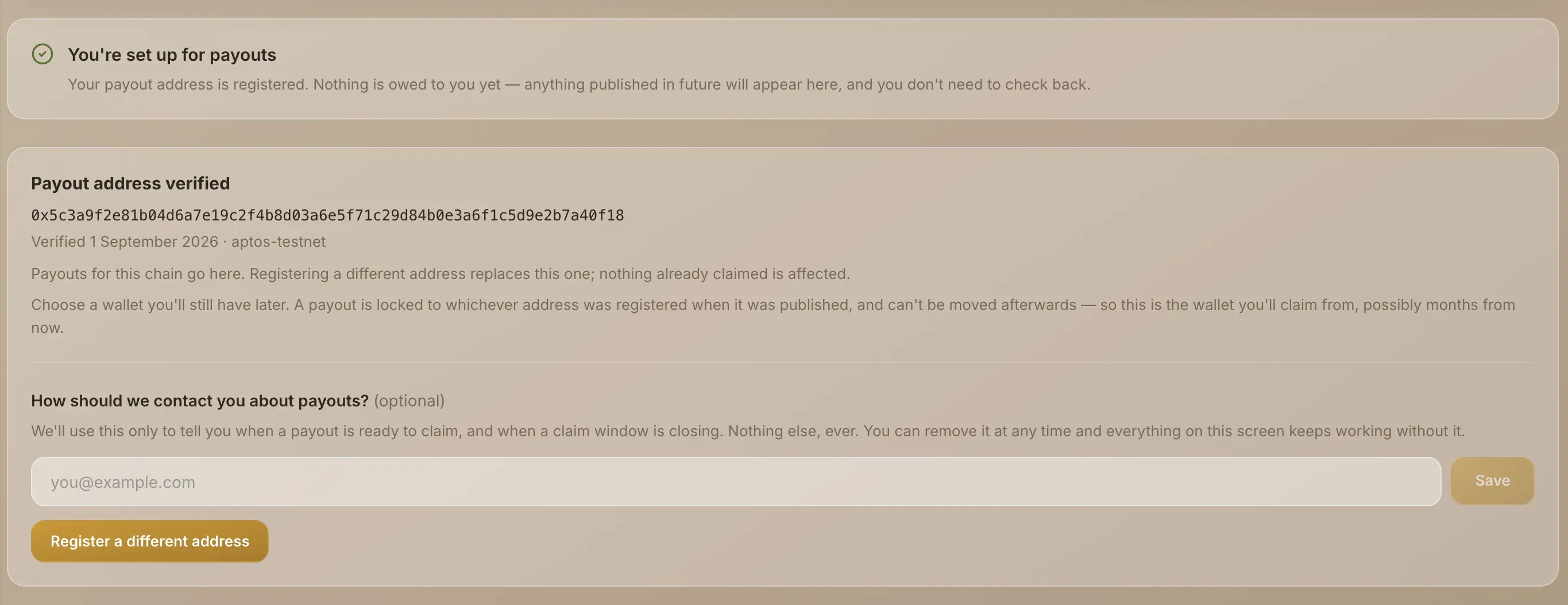
A payout is locked to the address that was registered when it was published, and it can't be moved afterwards. If you have no payout address at that moment, you're left out of that payout, and a published payout can't be edited. Register your address early. It takes about a minute and costs nothing.
The pool also requires your identity to be verified when a payout is published. See Verify your identity.
Changing your payout address
You can register a different Base or Aptos address at any time. Payouts prepared or published after the change go to the new address. Ones already prepared or published stay locked to the address they were made with, so choose a wallet you'll still have months from now.
Check whether you're ready
The Payout Preferences tab tells you where you stand:
- The payout readiness card says whether you still need to do anything, and warns you if you were left out of a published payout.
- The Aptos payout address card and the Base payout address card each show the address payouts go to and the date you verified it.
The app shows the current state rather than a promise. If you're registered and nothing has been published for you yet, the readiness card says You're set up for payouts and that nothing is owed to you yet.